
Our own build / Project 01
A clearer way
to get in touch.
We built KORPACT’s contact system to give every first conversation a clear place to begin — and keep the details together for a personal response.
See how it works- Built for
- KORPACT
- The work
- Contact automation
- Verification
- Built & tested end to end
01 / The starting point
Make the first
step feel simple.
As a new business building its first website, KORPACT needed a straightforward way to receive enquiries and book conversations.
The form needed to collect useful context, keep the recipient’s personal email address off the page and put each message somewhere it could be followed up. Visitors who preferred a conversation also needed a way to propose a time, with availability checked before confirmation.
Explore the contact page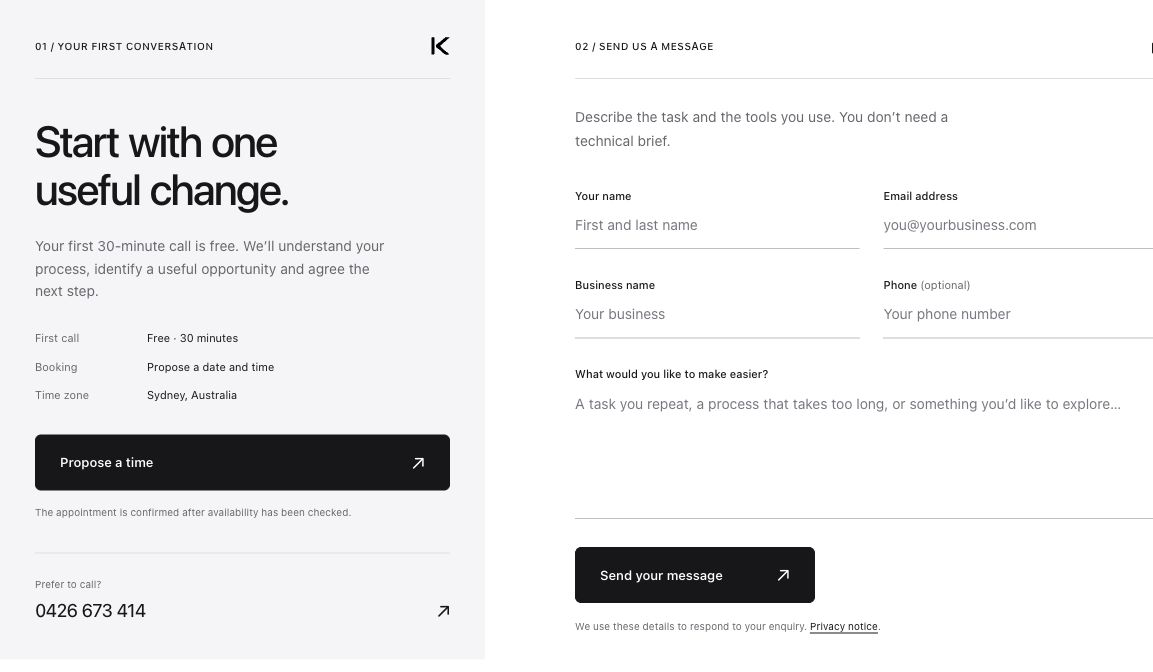
02 / From message to next step
A simple form.
A considered handover.
The visible part is a short form. Behind it, each enquiry follows a clear path from submission to an internal notification.
- 01 / Capture
A place to ask.
The visitor shares their name, business and the work they would like to make easier. The form checks the required details.
Website form - 02 / Record
Saved before
it moves on.The enquiry is stored with its own reference before notification begins. A received message has a record behind it.
Website database - 03 / Notify
The context
reaches Hugo.n8n picks up the pending enquiry and sends an internal email with the visitor’s details and message, ready for a personal reply.
n8n + Gmail - 04 / Confirm
A handover
with a record.After the email is sent, the workflow updates its notification status on the website. The enquiry and its handover stay connected.
Delivery acknowledgement
Prefer to choose a time?
Visitors can propose a preferred date and time for a free, 30-minute first call. A time request is confirmed after checking availability; it does not expose a calendar of available slots.
Propose a time03 / What we checked
Built. Connected.
Checked.
A real test enquiry was sent through the website. We checked the saved record, the email notification and the confirmation returned to the website.
See the working formEnquiry stored
The submission was saved with a reference.
Notification received
The internal email arrived in Hugo’s inbox.
Delivery recorded
The workflow acknowledged the successful send.
The right tool for the task
Clear rules.
A personal response.
The capture and delivery steps use rule-based automation. Hugo handles the response personally. This build focuses on receiving enquiries and making the handover clear.
The notification workflow currently runs on our local n8n installation. When it is offline, enquiries remain stored on the website and await notification delivery.